
Pay an invoice
You can pay Lancashire County Council invoices online, using a debit or credit card – Visa or Mastercard.
We do not currently levy charges for paying online using debit or credit cards.
Before you start
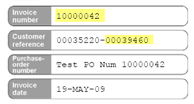
You will require the invoice number and the customer reference number from the invoice.
The customer reference number is last 8 numbers from the invoice. This is found in the top left-hand side of your invoice.
Payment methods
You can pay Lancashire County Council invoices online, using the following credit, or debit cards Mastercard, and Visa. You can also pay by direct debit.
Security certificates
Lancashire County Council use Worldpay electronic payment facility and all transactions, including card details, are encrypted for your security. In order for your web browser to encrypt the information, you may need to accept a digital certificate from Lancashire County Council which electronically verifies our identity. This certificate has been issued by Thawte (http://www.thawte.com), who are a leading global Certification Authority.
Depending upon your web browsers settings, you may receive a warning with regard to accepting this certificate. It is quite safe to do so.
Help
Help and information using this facility:
You cannot pay your Council tax here. Council tax is administered and collected by the 12 borough, city or district councils.
Our invoices look like this. These can be paid by debit or credit card.
The Invoice Number and the Customer Reference Number are at the top left-hand side of the invoice.
Making an online payment
Paying multiple invoices
If you are receiving services on a regular basis, the quickest and most convenient way to pay an invoice is by Direct Debit.
We will do all the work with the bank, and you won't receive invoices once the Direct Debit is set up.
We fully adhere to the Direct Debit Guarantee.
You will be notified of any increases to payments.
You are free to cancel at any time with immediate effect.
How to set up a Direct Debit
Complete the Direct Debit Mandate on the back of the invoice.
Return the Mandate to the service. The postal address is provided on the Mandate.
You need to send the original document with your signature. No copies of signatures will be accepted.
Once you have sent your Direct Debit Mandate, please allow up to 4 weeks for this to be set up.
Credit and debit card payments can be taken by ringing us directly on 0300 123 6702 Monday to Friday between 9.00am and 5.00pm.
If you have a query about the invoice or the amount you are being charged, you should contact the department that raised the invoice. Their contact details are shown on your invoice at the top right-hand side.
You will need the reference number from the payment should you need to query with Lancashire County Council which is also at the top right-hand side.
After receiving confirmation that your payment has been accepted, Lancashire County Council’s systems are updated overnight. It can take up to 5 working days for a card payment made by the website to be recorded against your invoice. If you have a query after this time, contact 0300 123 6702 with your order number and authorisation code details.
If you have made the payment by another route, this will take longer to appear against your account. If your payment is not recorded against your invoice after 15 working days, contact 0300 123 6702 with details of when and how your payment was made.
If you are having difficulty making a payment online, you can ring us for assistance, on 0300 123 6702 Monday to Friday between 9.00am and 5.00pm.
If you have made a mistake whilst paying, please contact us on 0300 123 6702 with the order number details and this will be investigated. Where appropriate a refund will be issued. We reserve the right
to refund you, using another method rather than onto your card.
This type of response means that your card issuer/bank has not authorised the payment.
Lancashire County Council are not informed of the reason why the transaction has been refused. If the problem persists, please contact your card issuer/bank to find out more information.
If this means you cannot pay using your chosen payment method, please refer to the invoice to find out how else you might pay.
If your payment is cancelled you should double check
the address and post code match the information held by your card issuer
the card verification code is correct
If the card payment is declined, the invoice is still outstanding and is not settled until an alternative successful payment has been received.